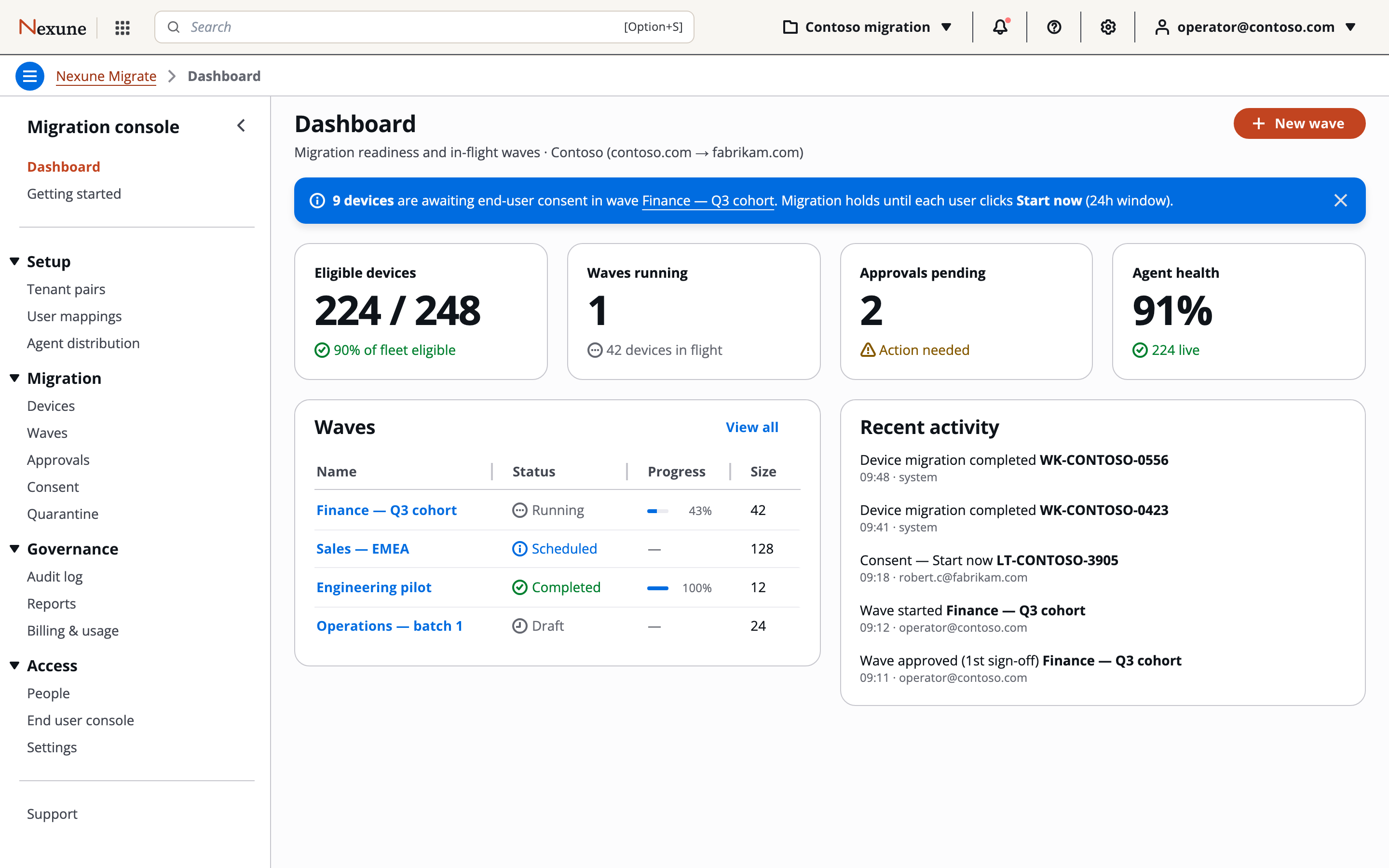
One console for the whole migration
Operators work a single pane from discovery to sign-off. This is the actual product, not a mock-up.
Zero-touch device migration for Microsoft 365 tenant-to-tenant moves
Nexune Migrate moves every Windows device from one Microsoft 365 tenant to another — identity, profile, Intune enrollment, BitLocker — without a technician touching the machine. Operators run discovery, identity mapping, readiness gates, and two-person approvals from one console; a native agent executes the move on each device through the same 11 phases — crash-safe and resumable; and every action lands in a hash-chained, WORM-notarized audit trail your CISO can sign.
Move entire Windows fleets between Microsoft 365 tenants — identity, profile, Intune enrollment, Autopilot, BitLocker — zero touch, with a signed audit trail underneath.
macOS support is on the roadmap — the same console, approvals, and audit chain, applied to Apple fleets. Tell us about your Mac estate and help shape it.
Lift devices from on-premises Active Directory into Entra join and Intune management — without reimaging. In development.
Planned: move your fleet to Microsoft Intune from ManageEngine, Workspace ONE, Jamf, JumpCloud, or NinjaOne — devices re-enrolled without reimaging, users untouched.
Operators work a single pane from discovery to sign-off. This is the actual product, not a mock-up.
Most M365 migration tools move mail, files, and SharePoint — they don’t touch the devices. Domain join, Intune re-enrollment, BitLocker escrow, profile swap, app reinstall: today that’s weeks of fragile manual work.
of manual work per migration, done by hand.
fragile, hand-rolled, unowned — holding the typical DIY migration together.
audit-grade evidence of who did what, when, where.
One console that discovers both tenants, prepares every device, migrates in approved waves, and proves what happened.
Every device, every user, every mapping conflict. Microsoft Graph scan, dedupe by serial, readiness scored 0–100 with blockers surfaced before you commit.
BitLocker keys escrowed. Provisioning packages built per-customer. Per-device .intunewin agent Authenticode-signed.
Every device moves through the same 11 phases. Resumable, observable, safe to retry. One consent click from the user; nothing else. Per-device session queues with retry + quarantine.
Hash-chained audit log. HSM-signed by approvers. Notarized into immutable storage. Every action, every device, retained immutably for seven years.
Live status, by design
The operator console streams live status from the control plane. Every state transition, every phase event, every quarantine — visible the instant it happens, with a graceful reconnect if you lose the network.
Two-approver production
Every wave is signed by an Azure Key Vault HSM key over the canonical wave manifest. Waves above 100 devices require a second approver. Separation-of-duties enforced: the operator who built the wave can’t be an approver. Approvals expire after 24h.
What employees see
End users see a single calm status page. They know when their device will move, they can defer (up to two times), and they can start immediately if they want. Migration runs in the background. When they sign back in, everything is where it was.
Security, the whole way through.
Azure Key Vault Premium HSM signs every approval and every notarization receipt. Every signature is traceable to the exact key version that produced it.
Every audit entry is cryptographically linked to the one before it — tampering is detectable. No log entry can be silently changed or removed.
Every 60 seconds, a per-customer batch is uploaded to immutable blob storage with a 7-year locked policy.
Every customer’s data is isolated at the database layer — enforced on every query, not just in app code.
Large waves need a second signer — and the creator can never be one of them.
A device can never run the same step twice — every retry picks up exactly where it left off, through all 11 phases.
Built on what your auditors already trust
| Capability | Nexune Migrate | BitTitan | ShareGate | Quest | DIY scripts |
|---|---|---|---|---|---|
| Device-level migration (not just content) | Manual | ||||
| Identity + profile SID swap | Manual | ||||
| BitLocker escrow + re-encryption | Manual | Manual | |||
| Cryptographically signed audit |
Customer case studies will be published as the first production migrations go live.
Click asked of the user
Consent — then software does the rest.
Audit notarization cadence
Per customer, signed + WORM.
Migration phases
Visible end to end.
Approvers per wave
>100 devices triggers second signer.
Two ways to buy, both self-directed — run it as your own IT team, or run every client on a partner plan.
Run the change yourselves, with the gates already built: your operators work the console, your approvers hold the keys, and the deadline stops being a weekend problem.
Partner plans are built in, not negotiated: every client in an isolated workspace, your engineers granted per client, Entra SSO with automatic provisioning, and pooled usage on a single partner invoice.
A 30-minute call to see the operator console, walk a live wave, and look at the audit chain. No deck, no script.